
Action on Google Introduction
An introductory overview of Action on Google—what it is, how it works with Google Assistant, and how Dialogflow helps you build conversational experiences.
2024-05-06 · 3 min read
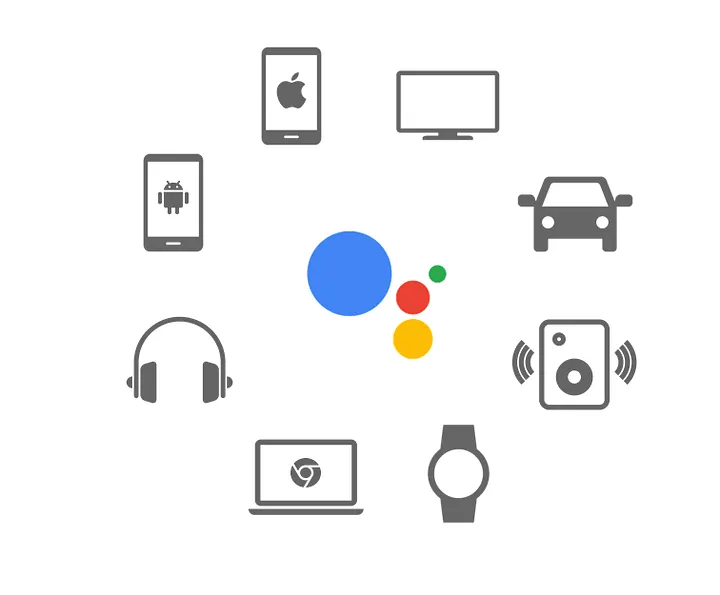
Photo by Google Assistant on Google Assistant for Developers
Hi folks, in this article I want to introduce Action on Google.
A while ago, I had the chance to share this topic in several universities. So I thought, why not write it down here so it can reach more people as well?
At this moment, not many people are familiar with this platform, even though it can reach thousands of devices — including smart speakers, phones, cars, TVs, headphones, and more. Action on Google itself is a platform that lets you build products which extend the functionality of Google Assistant and deliver rich conversational experiences.
What Is Action on Google?
With Action on Google, we as developers have the opportunity to:
- create our own custom conversational experiences,
- manage conversations with users,
- integrate our services into Google Assistant.
Action on Google combines three main technologies:
- machine learning
- speech recognition
- language understanding
These make it possible to understand what the user says and respond in a natural, conversational way.
How Does It Work?
At a high level, we use the Conversation API and the Actions SDK.
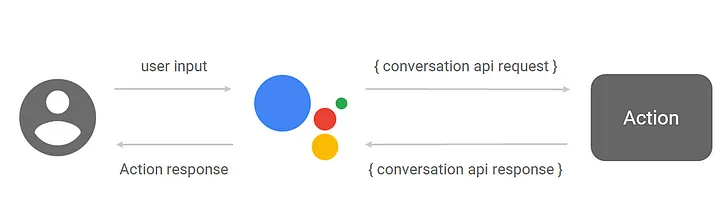
Photo by Google Assistant on Google Assistant for Developers
- The user says something to Google Assistant.
- The Action receives a request that contains the spoken text as a string.
- Google handles the speech recognition part — converting voice to text.
- The text is then parsed and processed so the system can understand the intent.
- A response is generated and Google Assistant speaks it back to the user.
The key point here: you don’t have to implement speech recognition or natural language parsing from scratch — Google takes care of that.
Why Dialogflow?
So, what tools can you use to build an Action on Google product?
A great choice is Dialogflow.
Photo by Google Assistant on Google Assistant for Developers
Dialogflow is a platform that makes it much easier to build conversational experiences. It lets you create conversational interfaces on top of your products and services by providing a powerful Natural Language Understanding (NLU) engine.
In other words, Dialogflow helps you process and understand natural language input, so you can focus more on the logic and experience, not on low-level language processing.
How Dialogflow Fits In
Once the user is talking to your Action, they start with what Google calls a “user says” phrase.
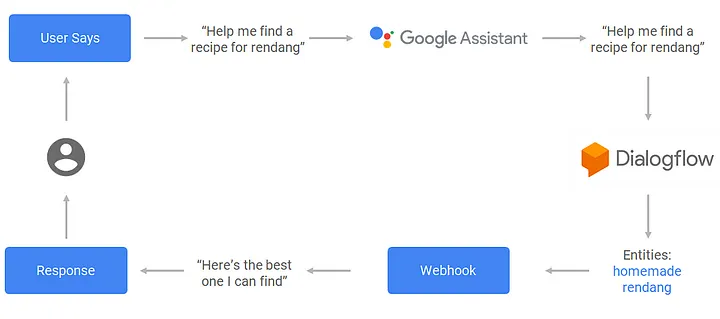
Photo by Google Assistant on Google Assistant for Developers
For example:
“Help me find a recipe for rendang.”
When the user says this to your Action:
- Google Assistant and Dialogflow process the phrase.
- Dialogflow finds the appropriate intent to handle it.
- The phrase is processed to extract entities (important pieces of information).
- Dialogflow calls your webhook with these entities and the action name.
- Your webhook does whatever logic you need (e.g., search recipes) and returns a response.
- The response is then spoken back to the user.
Even though the example looks simple, conversational experiences are actually quite hard to implement if you build everything from scratch. Interpreting and processing natural language requires a very robust language parser that understands all the nuances of language.
Dialogflow helps you achieve this more easily by handling NLU for you.
When you use Dialogflow, you create agents that can understand varied human language and translate it into structured data that your apps and services can work with.
Closing
That’s a short introduction to Action on Google.
In the next article, I’ll try my best to share a more concrete demo or hands-on example related to this topic.
Cheers!